Router login guide · Updated October 2026
192.168.2.1 Login Admin – Digisol, Belkin and Edimax Router Login
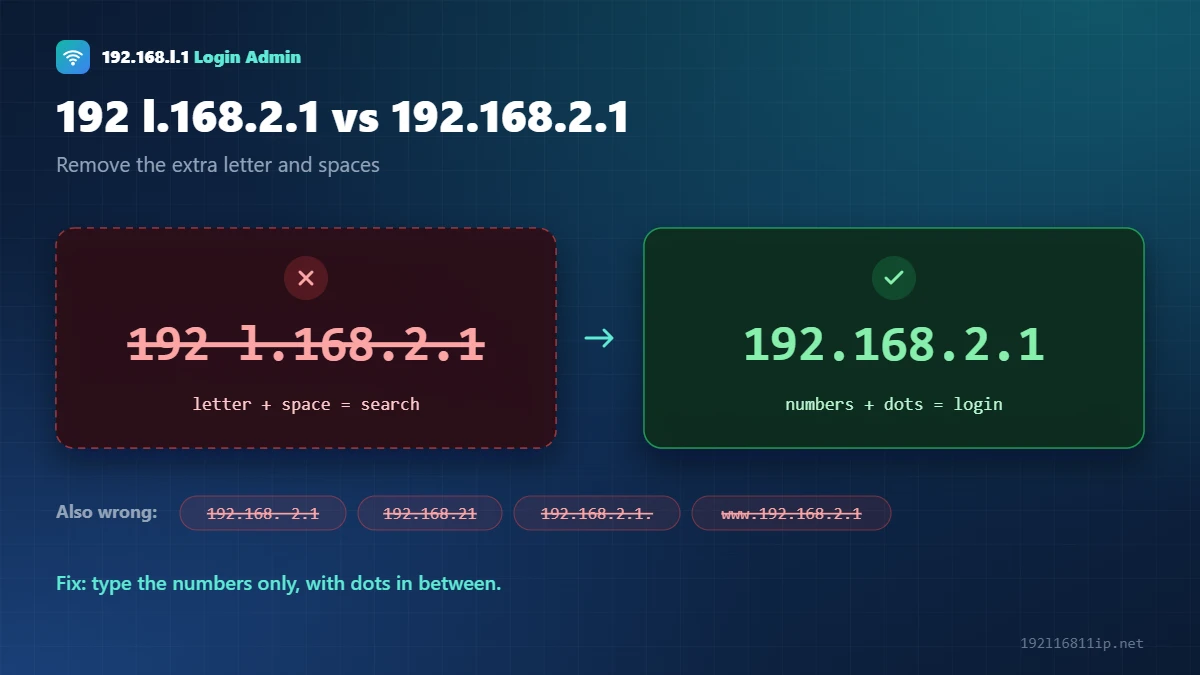
192.168.2.1 is the default login address for Digisol, Edimax and Belkin routers, and for Telekom Speedport boxes. If you typed 192 l.168.2.1 or 192.168. 2.1, remove the letter and spaces. The address only works as numbers and dots.
The button works only while your device is connected to that router or modem.
Quick Answer: How to Log In to 192.168.2.1
- Connect to the router by WiFi or LAN cable.
- Type 192.168.2.1 in the browser address bar and press Enter.
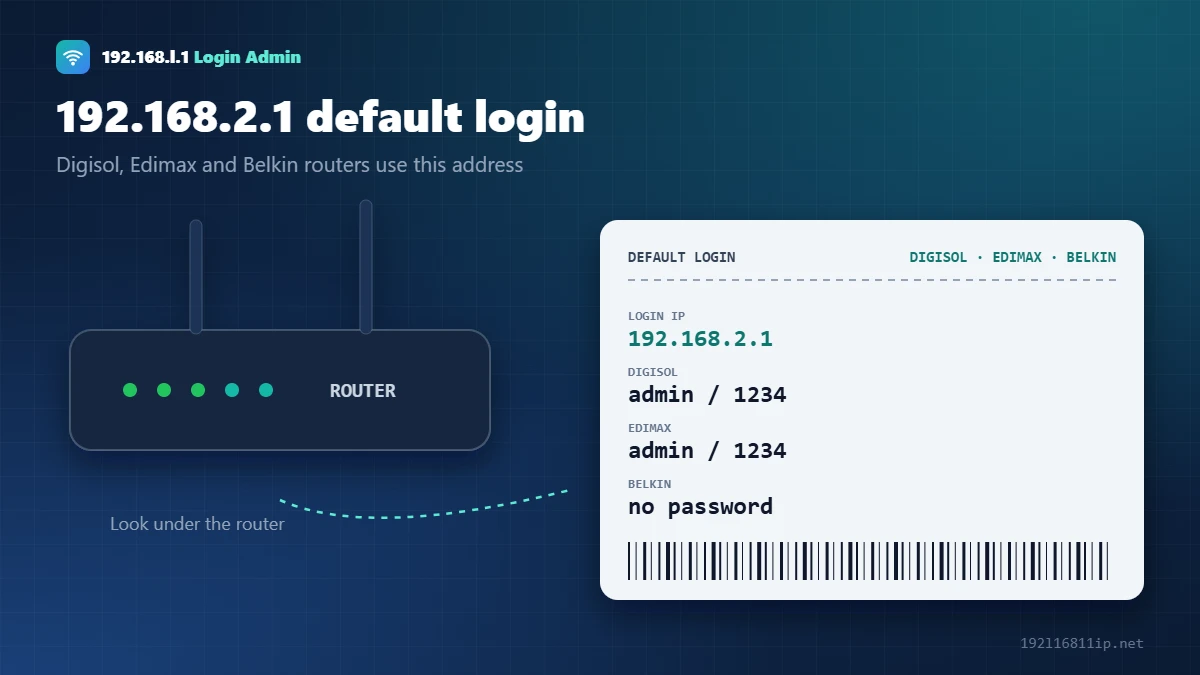
- Enter the login from the label. Digisol and Edimax use
admin/1234. Belkin has no password by default. - Change your settings and click Apply or Save.
This guide covers the 192.168.2.1 default logins, common typos, WiFi password changes and login fixes. If your router uses another address, start with our 192.168.1.1 login guide.
What Is 192.168.2.1?
192.168.2.1 is a private IP address that some router makers use as the default gateway. It works the same way as 192.168.1.1 and 192.168.0.1. Only the third number is different, and it works only inside your home network.
192 l.168.2.1 and Other Typos
| What people type | What’s wrong | How to fix it |
|---|---|---|
| 192 l.168.2.1 | Letter “l” and a space | Remove the letter l and the space |
| 192.168. 2.1 | Extra space | Remove the extra space |
| 192.168.21 | Missing dot | Add the missing dot before the last 1 |
| www.192.168.2.1 | “www.” added | Delete the www. part |
| 192.168.2.1:8090 | Port added | Remove the port unless your device needs one |
192.168.2.1 Default Username and Password
| Brand | Login address | Username | Password |
|---|---|---|---|
| Digisol | 192.168.2.1 | admin | 1234 or admin |
| Edimax | Same IP | admin | 1234 |
| Belkin | Same IP or http://router | none | blank (set one after login) |
| Telekom Speedport | Same IP or speedport.ip | none | device password on the label |
More brands are in our default router password list.
How to Change WiFi Password at 192.168.2.1
- Log in at 192.168.2.1.
- Open Wireless or WLAN settings, then Security.
- Choose WPA2-PSK (AES) or WPA3 and type a new password of at least 12 characters.
- Click Apply and reconnect your devices.
Full brand menus are in our guide on how to change your WiFi password.
192.168.2.1 Not Working? 6 Fixes
- Type it exactlyNumbers and dots only, with no spaces or letters.
- Check the gatewayYour router may use 192.168.1.1 or 192.168.0.1. Run ipconfig on Windows to check.
- Connect to the routerJoin its WiFi or use a LAN cable. Mobile data will not work.
- Use httpType http://192.168.2.1 instead of https.
- Try another browserClear the cache or use a private window.
- Reset if locked outHold the reset button for 10–30 seconds to restore the default login.
How to Find Your Router’s Real IP Address
If the login page does not load, your router may use a different address. Your device always knows the correct one — it is called the default gateway:
- Windows: press Windows + R, type
cmd, press Enter, then typeipconfig. Look for Default Gateway. - Mac: open System Settings → Network, select your connection, click Details and open TCP/IP. The address next to Router is the one you need.
- iPhone and iPad: go to Settings → Wi-Fi, tap (i) next to your network and look for Router.
- Android: open Settings → Wi-Fi, tap your network and look for Gateway (sometimes under Advanced).
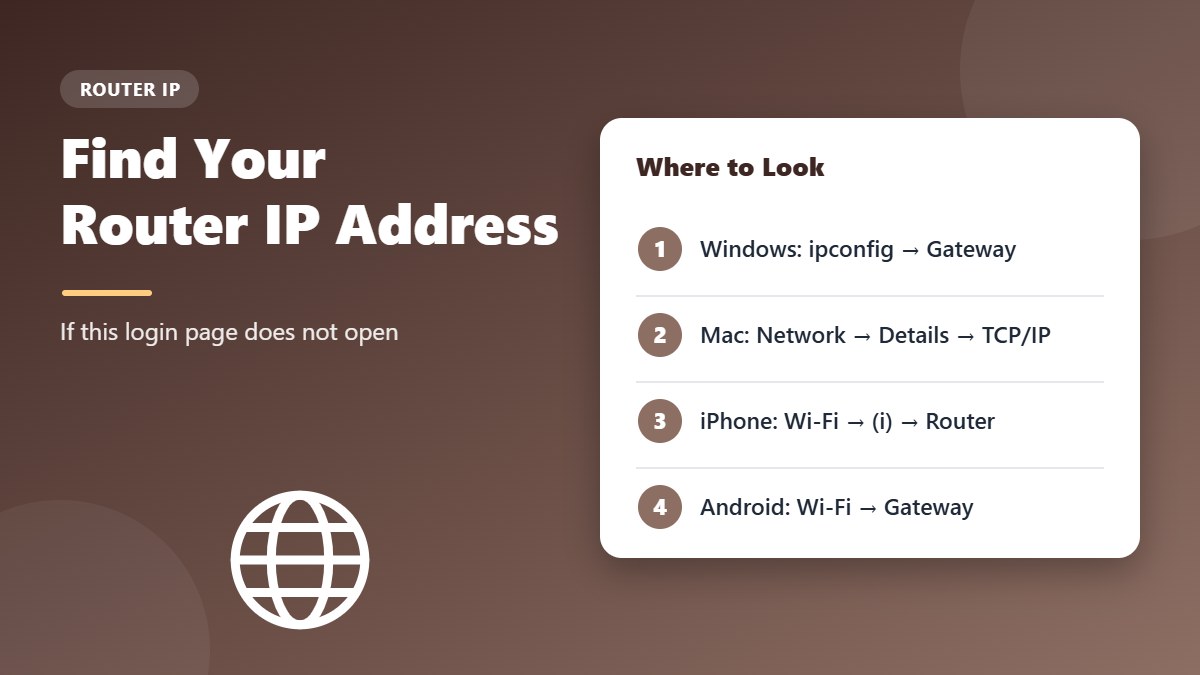
Type the gateway address into your browser exactly as shown. If it starts with 192.168.0 or 192.168.1, see our 192.168.0.1 or 192.168.1.1 guides instead.
Change the Admin Password on Digisol, Edimax and Belkin
The factory logins for these brands are short and widely published, so replace them right after you sign in:
- Log in to the router with the current username and password.
- Open Management, Administration, System or Utilities, depending on the model.
- Choose Password, Admin Password or System Settings.
- Enter a new password of at least 12 characters, confirm it and click Apply or Save.
Store the new password safely. Forgetting it means a factory reset, which erases your WiFi name, password and internet settings.
Secure Your Router in a Few Minutes
- Choose WPA2-PSK (AES) or WPA3 for your WiFi. Avoid WEP and WPA-TKIP — see the Wi-Fi Protected Access article for why.
- Use a WiFi password of 12 or more characters that is different from the admin password.
- Turn off WPS and remote management if you do not use them.
- Check for firmware updates on the manufacturer’s support page for your exact model.
- Review connected devices regularly and block anything you do not recognise.
Older Digisol, Edimax and Belkin models may no longer receive firmware updates. If your router is more than five or six years old and the support page shows no recent updates, it may be time to replace it with a newer model that supports WPA3.
Tip: after any change, write down the new settings or save a backup file from the admin page. Restoring a backup takes seconds, while setting everything up again by hand can take much longer.
Tips for Better WiFi Coverage
Small changes to where and how the router is set up often improve speed more than any setting:
- Place the router in a central, raised spot, not on the floor or inside a cabinet.
- Keep it away from microwave ovens, cordless phones, mirrors and thick concrete walls.
- Use the 5 GHz band for nearby devices and 2.4 GHz for devices that are further away.
- Restart the router every week or two to clear its memory.
- Add a WiFi extender or mesh point halfway to rooms with a weak signal.
Restart vs Reset: What Is the Difference?
These two words are often mixed up, but they do very different things. A restart (or reboot) simply turns the router off and on again. It keeps all your settings and fixes many slow or dropped connections. A reset (or factory reset) erases everything — WiFi name, passwords and internet settings — and brings back the factory login. Always try a restart first, and reset only when you are locked out or the settings are badly wrong.
To restart safely, unplug the power cable, wait about 30 seconds, and plug it back in. Give the router two to three minutes to start up fully before you test the connection again.
How to Set Up Port Forwarding
Some games, security cameras and home servers need a port opened on the router. The menu is usually called Port Forwarding, Virtual Server or NAT:
- Give the device a fixed local IP address, either on the device itself or with a DHCP reservation in the router.
- Open the Port Forwarding or Virtual Server menu.
- Enter the port number (or range), choose TCP, UDP or both, and type the device’s local IP.
- Save the rule and test it from outside your network.
Only open the ports you really need, and remove rules you no longer use. Every open port is a possible way in.
If a port rule does not work, check that the device still has the same local IP address and that its own firewall allows the connection.
Is It Time to Replace Your Router?
Many routers that use this address are older budget models. Consider an upgrade if you notice any of these signs:
- The manufacturer has not released a firmware update for several years.
- The router has no 5 GHz band, or does not support WPA3.
- Your internet plan is faster than the speed you get over WiFi, even close to the router.
- The connection drops several times a day, even after a reset.
A modern WiFi 6 router handles many phones, laptops and smart devices at once, offers better security, and usually comes with an easy setup app.
Frequently Asked Questions
Which routers use 192.168.2.1?
Digisol, Edimax and Belkin routers use it by default, and so do Telekom Speedport boxes. Other routers can be set to it manually.
What is the default Digisol router password?
Digisol routers usually use admin as the username and 1234 or admin as the password. Check the label to be sure.
Is 192 l.168.2.1 correct?
No. It contains a letter and a space. Type the address with numbers and dots only.
Why does 192.168.2.1 not open?
You may not be connected to the router, or your router may use a different address. Check the Default Gateway on your device.
How do I reset a Digisol, Edimax or Belkin router?
Hold the reset button for 10–30 seconds while it is on. Then log in with the default details.
Related Router Guides
Summary
192.168.2.1 is the login address for Digisol, Edimax, Belkin and Speedport routers. Type it without letters or spaces, connect to the router and use the details on the label. Change the default password after you log in.